
How to Show Retail Price but Hide Wholesale Price From Guests on Shopify

To show retail prices but hide wholesale prices from guests, keep the retail price as the store price and attach wholesale prices to a customer tag or company. Guests see retail. Logged-in, tagged buyers see their own price. For products that are wholesale only, hide the price from guests with BSS B2B Lock.
Looking to hide all prices from guests? That is a different job. Read the full guide Shopify hide prices. This page covers the narrower case where retail prices stay public.
Pick a collection or tag, hide the price and Add to cart for guests, and keep every other price visible. Paid plans for price rules, 7-day free trial.
Install BSS B2B Lock See pricingLast updated October 4, 2026. Shopify facts come from the Help Center pages linked in the text. BSS B2B Solutions makes BSS B2B Lock and BSS B2B Solution, the apps in the screenshots. This guide belongs to the access control hub of our complete guide to Shopify B2B.
Key takeaways
- There are two setups, and they are not the same. One product with two prices (retail for guests, wholesale for buyers), or wholesale-only products whose price a guest must not see.
- Two prices on one product need no hiding. A guest does not match the wholesale rule, so the page shows the regular price. Shopify says only logged-in B2B customers can access B2B-specific pricing (Shopify Help Center).
- Wholesale-only products need a lock. BSS B2B Lock hides the price and Add to cart for the collection or tag you pick. Other products keep their price.
- This is display control, not security. Public product endpoints can still return prices (Shopify Ajax Product API). Keep real secrets off the storefront.
- Test as a guest, an untagged account and a tagged buyer, on a product page, a collection, quick view and the cart.
What does “show retail, hide wholesale” mean on Shopify?
Shop owners use the phrase for three different situations. Pick yours first, because the tool is different for each.
| Setup | What a guest sees | What a wholesale buyer sees | Tool |
|---|---|---|---|
| A. One product, two prices | The regular retail price | The wholesale price, often next to the struck-through retail price | Native catalogs, or Custom Pricing in BSS B2B Solution |
| B. Wholesale-only product | A message instead of the price, and no Add to cart | The price and the buy button | BSS B2B Lock on a collection or tag |
| C. Quantity tiers for buyers only | The retail price, no tier table | The tier table under the price | Volume Pricing in BSS B2B Solution |
Setup A is the common one for a blended store that sells to both groups. What is a blended store? In setup B you want guests to know the product exists, so only the price is hidden (hide price). If you want to hide the whole catalog, hide wholesale collections from guests is the use case.
Method 1: Shopify catalogs show wholesale prices only to logged-in B2B buyers
Shopify’s native B2B gives a company a catalog with its own prices. Shopify states that only logged-in B2B customers can access B2B-specific pricing, B2B-only products and B2B-exclusive store content, and that by default your B2B store is publicly accessible (Customer login and accounts). So a guest sees the normal store price, and a logged-in buyer in a company location sees the catalog price. Shopify does not describe what guests see in more detail on that page, so check your own theme in a private window.
Limits: Basic, Grow and Advanced allow up to 3 active catalogs across all B2B markets, and a buyer needs a company and a location (plan table). Native catalogs can also make a product B2B-only: unpublish it from the Online Store channel and keep it in an active catalog, and B2B customers see it after login (Creating catalogs). That hides the whole product, not just its price, so guests cannot see that it exists. Read Shopify native B2B for the full comparison.
Method 2: Custom pricing by tag in BSS B2B Solution
Use this when you need more than three groups, or you price by tag. You keep the retail price on the product. A Custom Pricing rule applies a wholesale price to buyers who match, for example customers with the customer tag wholesale. A guest does not match, so the storefront shows the regular price (set unique prices for wholesale customers).
Step 1: Create the rule for the wholesale tag
Open B2B pricing, then Custom Pricing, and add a rule. In the Customers card choose Customer tags and enter your tag. In the Price card choose a percentage, a fixed amount or a fixed price. Tag the customer when you approve them, for example from the wholesale registration form with approval. See wholesale price by customer tag for the full flow.
Step 2: Choose how buyers see the price
In Custom Pricing, then Settings, the price display mode has three options: the custom price only, the custom price with the compare-at price, or the custom price with the original price (recommended). These settings are for logged-in buyers who match. If you choose the first, a buyer sees only the wholesale price (display settings). A custom price shows only when it is lower than the original price.
Step 3: Compare the guest and the buyer views
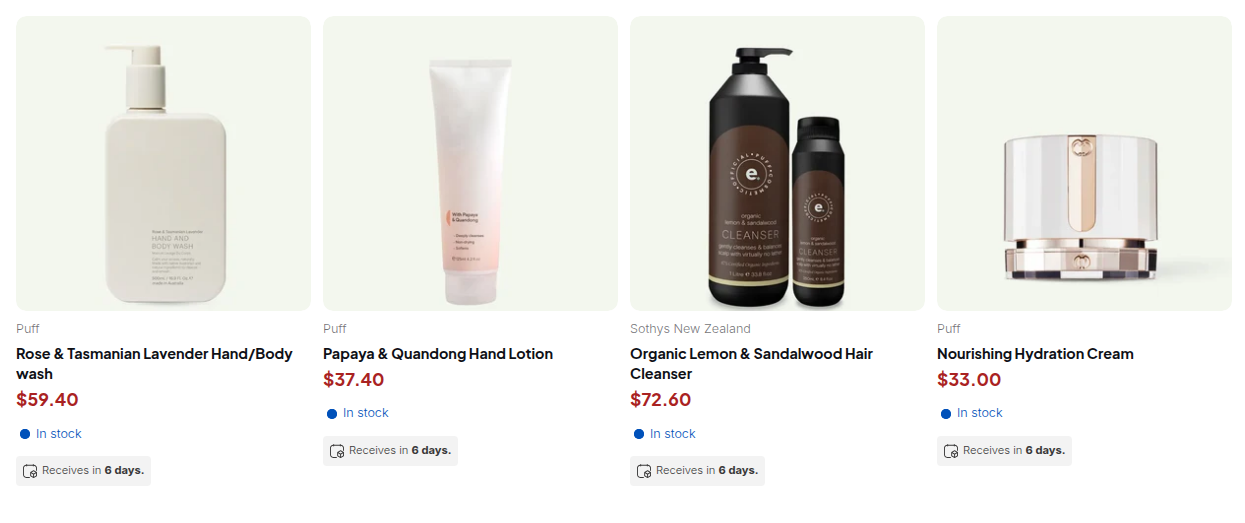
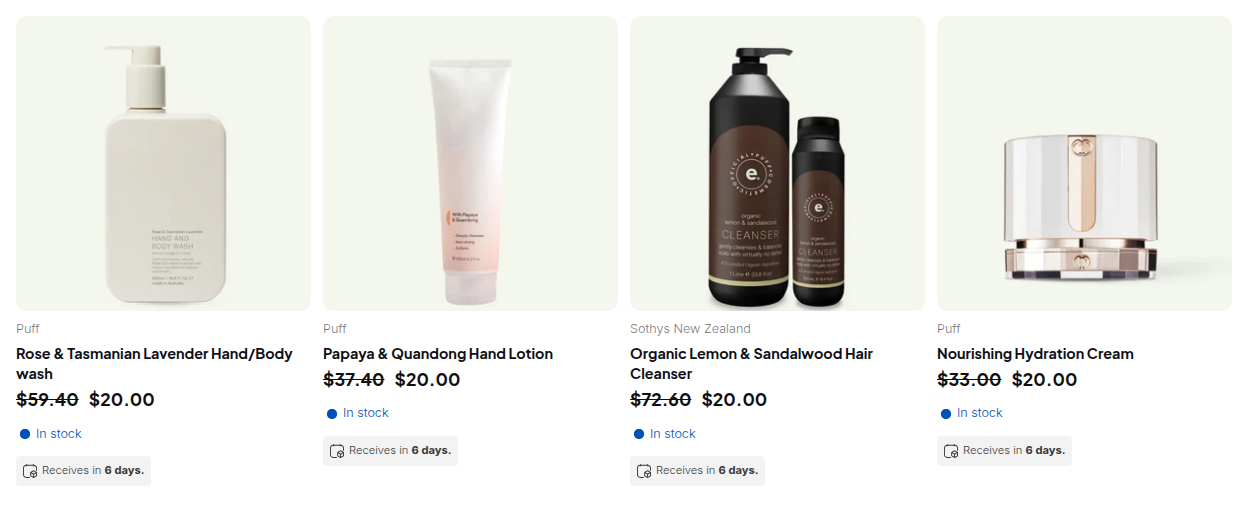
If you want the buyer to see the retail price as a reference, that is the third mode, and it is the MSRP, compare-at and wholesale price pattern. A price rule shows a price. It does not hide a price from a guest, so it is the right tool when guests may see retail.
Method 3: Hide the price of wholesale-only products with BSS B2B Lock
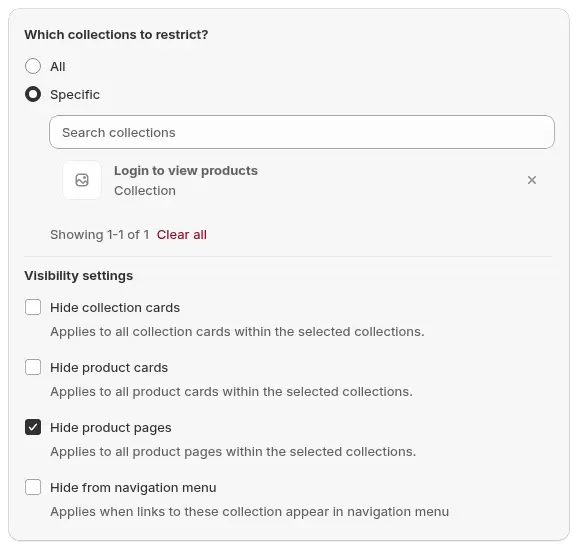
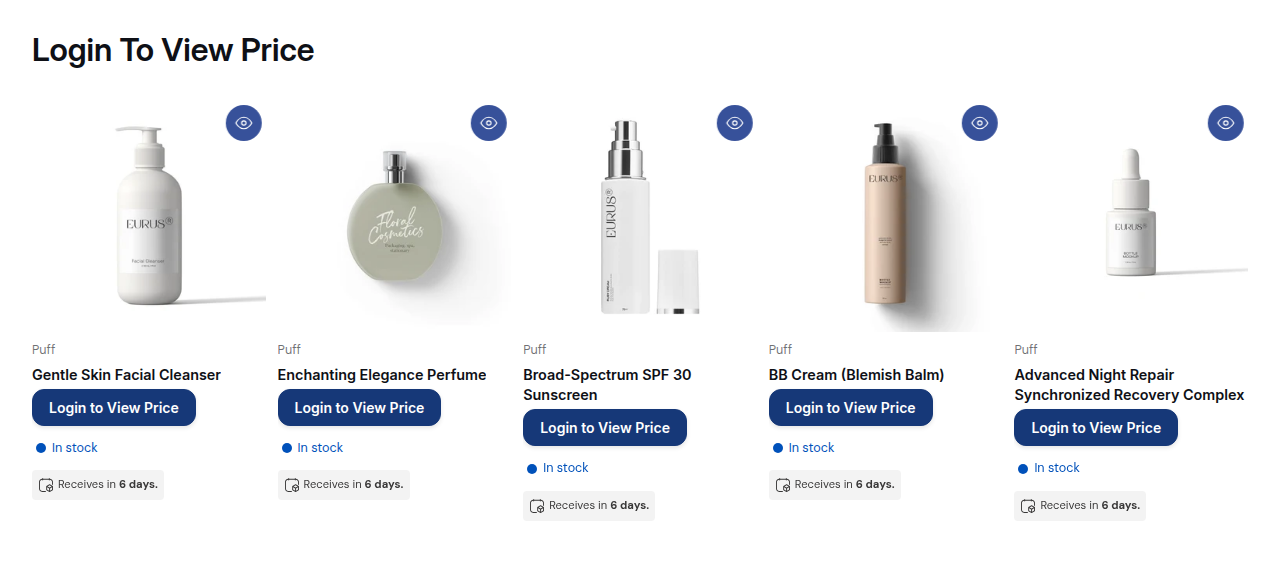
Use this when a collection or tag holds products that should not show any price to guests. In BSS B2B Lock the lock target is Price and add to cart. In the rule set Restricted products to By collections or By tags and pick the wholesale collection or tag. Everything else keeps its price. See hide wholesale prices from guest visitors and the Lock guide for hiding prices.
Step 1: Pick the wholesale collection or tag
Step 2: Choose what to hide
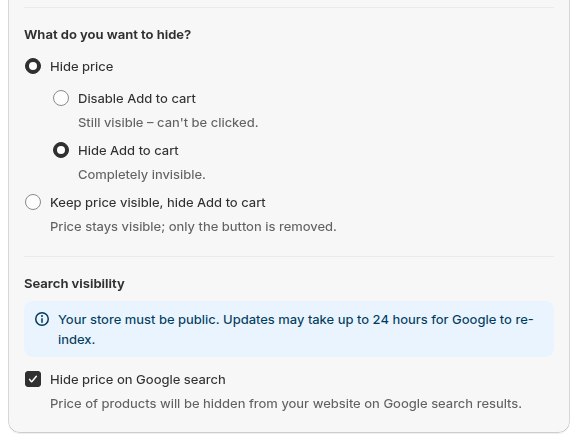
Choose whether to hide the price, disable or hide Add to cart, or keep the price visible and hide only the buy button. An optional Hide price on Google search setting makes prices less likely to appear in results. It does not remove the page from Google, and changes can take up to 24 hours.
Step 3: Let the right buyers see the price
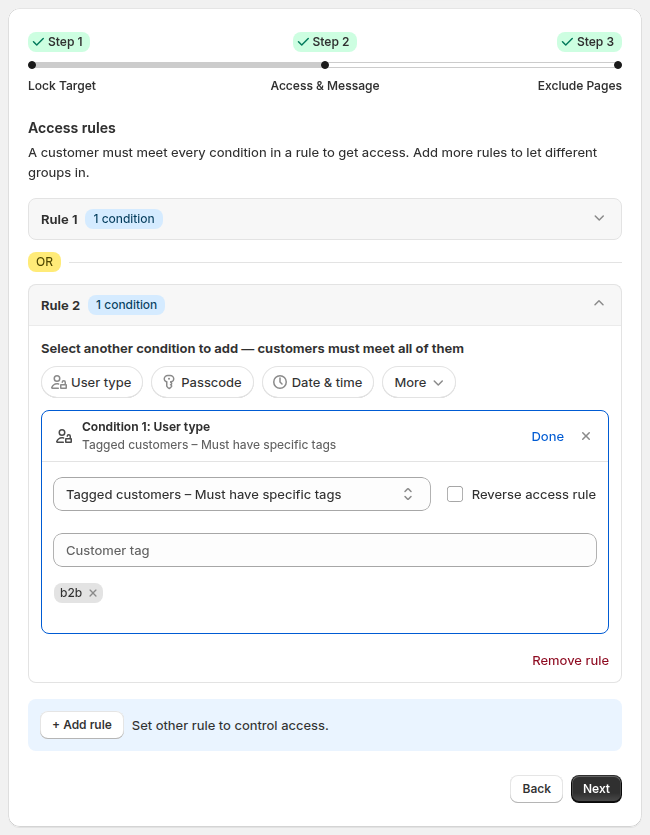
Add an access rule. Signed-in customers can see prices, or only customers with a tag such as b2b. Conditions in one rule combine as AND, and separate rules are OR, so a second rule can grant access to tagged customers. Pair it with BSS B2B Solution to tag buyers when you approve them.
Price rules in Lock need a paid plan. The Free plan locks the entire website by condition. If guests should ask for a price, add a Request a Quote button in BSS B2B Quote.
Which method should you use?
| Your situation | Use | Why |
|---|---|---|
| Few buyer groups, buyers are Shopify B2B companies | Native catalogs | Included in the plan, up to 3 active catalogs below Plus |
| Wholesale by tag, retail stays public on the same products | Custom Pricing in BSS B2B Solution | Guests see retail, tagged buyers see wholesale |
| Products that are wholesale only | BSS B2B Lock on a collection or tag | The price and buy button are hidden from guests |
| Tiers for approved buyers only | Volume Pricing with a tag rule | The table shows only to matching buyers |
| Prices must never be visible to anyone outside | Do not publish them on the storefront | No storefront rule is a vault |
What guests can still find
- Not a security feature. These rules control what the storefront shows. Public product endpoints can return prices, for example the Ajax Product API (shopify.dev).
- Theme-based. BSS B2B Lock works with Online Store 2.0 and legacy themes. Headless storefronts are not supported. Unusual themes may need a manual install.
- Other prices on the page. A popup, quick view, a review app or a structured data block may print a price. Test every place a price shows.
- Search results. Hide price on Google is best effort. Lock does not change your Merchant Center feed. Read hide prices from Google search results.
- Checkout. Hiding a price does not stop a buy. For Shopify Plus stores, a checkout lock can block unapproved buyers. See block checkout for unapproved buyers.
Test checklist: retail visible, wholesale hidden
- In a private window as a guest: the product page, collection page and cart show retail prices, or the lock message for wholesale-only items.
- Logged in without the tag: the same as a guest.
- Logged in with the tag: the wholesale price, or the price on wholesale-only products.
- Quick view, search results and any popup show the same as the product page.
- The cart and checkout total match what the buyer saw.
- A phone shows the message cleanly.
Show retail price, hide wholesale price: frequently asked questions
Can I show retail prices to guests and wholesale prices only to logged-in customers?
Yes. Keep the retail price on the product and attach wholesale prices to a tag, customer or company. Shopify catalogs and Custom Pricing in BSS B2B Solution both work this way: a guest does not match, so the regular price shows.
Does Shopify have a built-in way to do this?
Native B2B catalogs give logged-in B2B customers their own prices. Shopify states that only logged-in B2B customers can access B2B-specific pricing. Native catalogs can make a product B2B-only by unpublishing it from the Online Store, which hides the whole product from guests, not just its price.
How do I hide the wholesale price but keep the product visible?
Use BSS B2B Lock with the target Price and add to cart, restricted to the wholesale collection or tag. Guests see the product and a message in place of the price.
Will guests see the wholesale price in the cart?
A guest does not match the wholesale rule, so the cart shows the regular price. Test your own flow, because themes with a cart drawer or a quick view can need manual setup.
Can Google show my wholesale prices?
Prices that guests can see can appear in search results. Lock has an option, Hide price on Google search, that makes prices less likely to appear. It is best effort, can take up to 24 hours and does not remove the page.
Do I need BSS B2B Lock and BSS B2B Solution together?
Not always. Two prices on one product need only BSS B2B Solution or a native catalog. Hiding the price of wholesale-only products needs Lock. Together, Solution can tag approved buyers and Lock can read the tag.
Is hiding the price a security measure?
No. These rules control what the storefront shows, and public product endpoints can still return prices. Do not rely on them for anything confidential.
How much do the apps cost?
BSS B2B Lock is free to install, and price rules are on paid plans from $9.99 per month with a 7-day trial. BSS B2B Solution starts at $29 per month on paid plans with a 14-day trial. App Store prices as of October 4, 2026.
Next steps
Decide which of the three setups you run, build the rule for one group, and test as a guest and as a tagged buyer. Our Shopify hide prices guide covers hiding every price, and the wholesale pricing hub covers price rules.
Install BSS B2B Lock to hide the price on wholesale-only products. Add BSS B2B Solution to tag approved buyers and price by tag.
Install BSS B2B Lock BSS B2B SolutionSources
Shopify pages read on October 4, 2026. BSS facts: the BSS B2B Lock and BSS B2B Solution user guides at docs.bss-b2b.solutions, our October 2026 review of the apps’ behavior, and the Shopify App Store listings (as of October 4, 2026).
- Shopify Help Center: Customer login and accounts for B2B
- Shopify Help Center: Shopify B2B features by plan
- shopify.dev: Ajax Product API
- BSS user guide: Hide prices from guest users (Lock)
- BSS user guide: Set unique prices for wholesale customers
- BSS user guide: Display custom pricing
You may also like

How to Uninstall a Shopify B2B or Lock App Safely: Remove Leftover Theme Code
Some Shopify apps leave code in your theme after you uninstall them. To remove a B2B or lock app safely, duplicate your […]

Shopify Markets and B2B Pricing: Wholesale Prices Per Country and Currency
Shopify Markets control currency, languages and taxes by audience, and B2B catalogs can be assigned per B2B market, with a cap on […]

How to Collect and Validate a Tax ID (EIN, ABN, GST, UK VAT) on Shopify
Shopify has a Tax ID field on company locations, but the pages we read describe no check against a tax register. BSS […]