


Apes Lab is an Italian training and lifestyle brand that sells apparel, backpacks, eyewear and shoes to consumers on Shopify. It also runs a B2B channel in the same store: a footer link opens a business access form that requires a VAT number. BSS B2B Solution adds the rules behind it, from customer-tag pricing to quantity increments.
Key facts from the public storefront
- Model: hybrid. The storefront is a B2C store first, and the B2B route is a registration form linked from the footer.
- Business filter: the access form requires a Partita IVA, the Italian VAT number.
- Languages: Italian, English and German versions of the storefront, plus a country selector.
- Wholesale area: a B2B collection exists, and a guest who opens its URL lands on the homepage.
- Review: the merchant calls the app “amazing” and praises the customer service.
About Apes Lab
Apes Lab presents itself as “Training. Lifestyle. Accessories.” under the hashtag #BornToEvolve. The footer names the operator as Athlete Division S.R.L., an Italian company. The main navigation covers men, women, backpacks, eyeglasses, accessories and shoes, and the collections pages include essentials, basics, a “Train like a beast” range and an original line. The homepage promotes seasonal offers and a free-shipping threshold of 99 euro.
The catalog mixes the brand’s own apparel with third-party sportswear and footwear. A women’s training shoe on the product page we opened sits next to a size selector, a colour swatch, a stock notice, an add-to-cart button and PayPal. The product copy is in Italian, with an English version at /en-en and a German version at /de. A country selector in the footer changes market and currency.
In other words, Apes Lab is the kind of store that most B2B guides overlook. Consumers are its main audience, the catalog is large, and wholesale is a second channel that has to live inside the same theme without disturbing the retail experience.
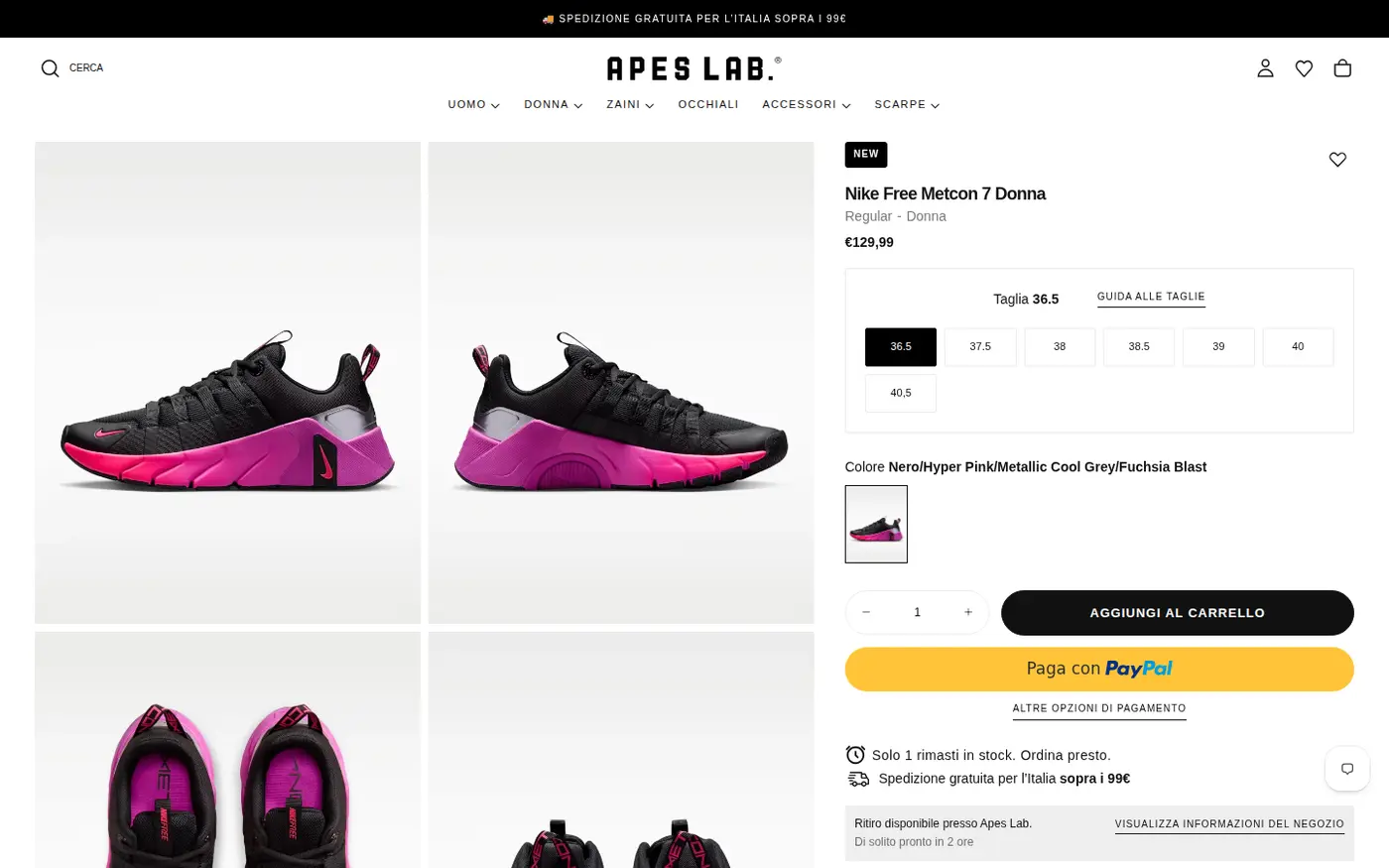
A consumer store of this kind has a lot at stake. Retail prices, promotions and the checkout experience are tuned for shoppers, and a wholesale channel must not undo that. That is why the B2B side of Apes Lab is built from rules that apply only to approved accounts, rather than from changes to the theme that everyone sees.
Apes Lab’s B2B model: access on request
Apes Lab does not advertise wholesale on its homepage. There is no banner and no menu item. The route in is a link called “B2B registration” in the Useful pages column of the footer, next to Contact us and Near. A business that knows to look finds it, and a consumer browsing the shop is never asked to think about wholesale.

Who can apply
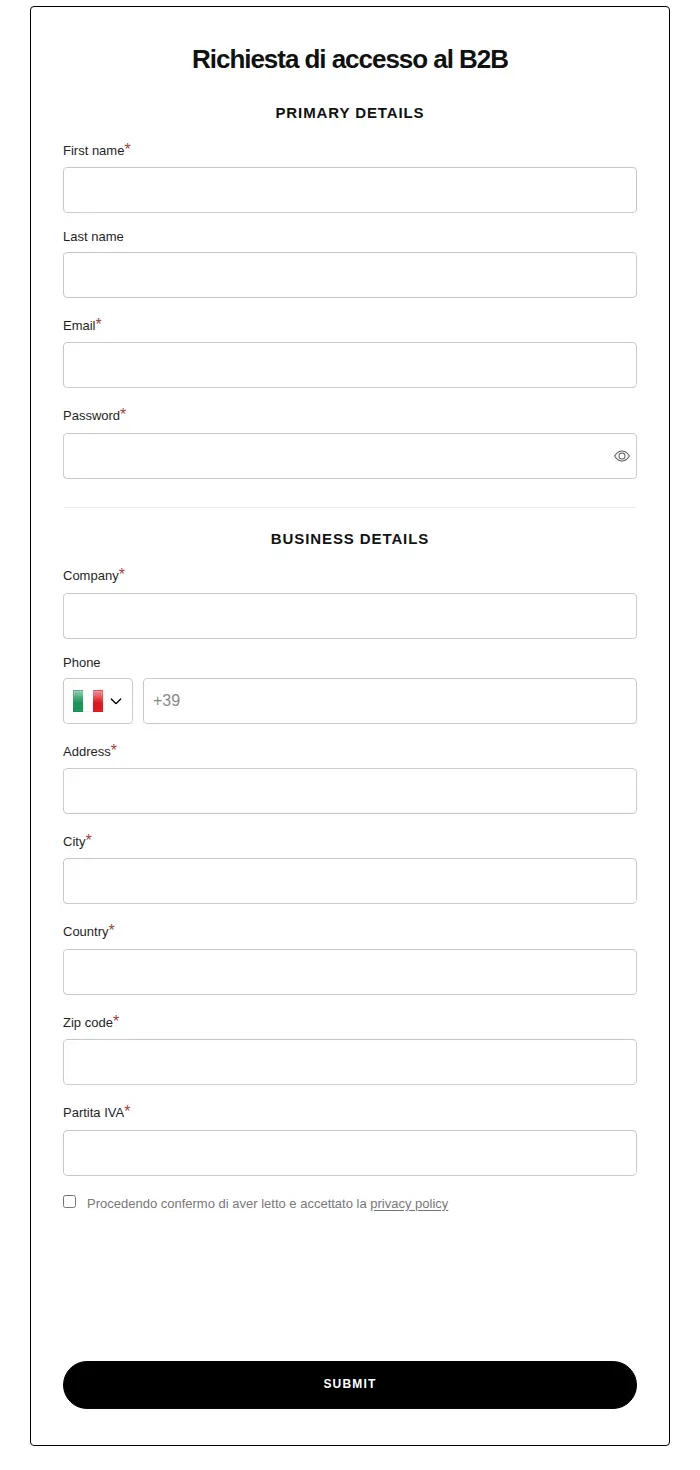
The form is titled “Richiesta di accesso al B2B” (request for B2B access). It asks for a company name and, as a required field, the Partita IVA, the Italian VAT number. Requiring a VAT number makes the form a filter. A private shopper does not have one, and a business can supply it in seconds. The same field can also be used to check the company before approval.
What the form collects
The form has two sections. Primary details asks for first name, last name, email and password. Business details asks for company, phone with a country prefix, address, city, country, a state or region field, zip code and the Partita IVA. A consent line at the bottom says that by continuing the applicant has read and accepted the privacy policy. Last name and phone are optional, while company, address, city, country, zip code and the VAT number are mandatory. The form is short enough for a retailer to complete in a couple of minutes.
How the storefront handles wholesale
1. One storefront, three languages
The store is available in Italian, English and German. In the English version we opened, the form heading stays in Italian (“Richiesta di accesso al B2B”) while the field labels appear in English, a good reminder to test translations on every page of a registration flow. The form includes a country field, so a retailer outside Italy can state where it is based.
2. A public price for guests
Guests see one retail price on product pages and no mention of wholesale. Apes Lab keeps the B2B price list private to approved accounts, so the public store does not need price hiding. This is the main difference from stores such as a B2B-only distributor, and it makes the setup simple for shoppers.
3. A B2B collection guests cannot open
The store has a collection with the handle b2b. When a guest opens its URL, the request ends on the homepage instead of showing the collection. We cannot tell which mechanism produces that redirect, but it behaves like the pattern described in hide wholesale collections from guests.
4. The form on a phone
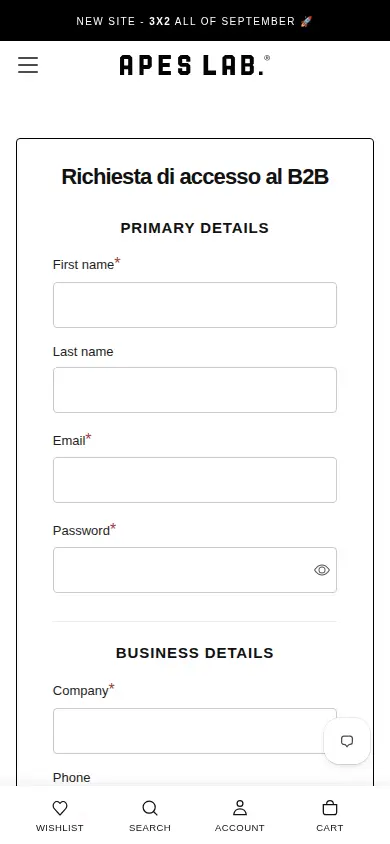
On a phone the form stays a single column with large fields. A sticky bottom bar offers Wishlist, Search, Account and Cart, so the B2C navigation is unchanged.
Which BSS features power it
Apes Lab is on BSS B2B Solution’s Advanced plan. Its review says the app is “amazing” and that the team made front-end customizations so customers get “the best experience”. The storefront loads the app’s theme extension, and the configuration we could verify, in categories only, is:
- Customer-targeted pricing. Seven custom pricing rules are active. Five target customer tags, by collection or by product, and two target chosen customers. Most give a percentage discount, and one sets a fixed price. A further tag rule is disabled. See set unique prices for wholesale customers and wholesale discounts by collection or product tag.
- Quantity rules. Two quantity increment rules, one for tagged customers on chosen products and one for chosen customers, and one volume pricing rule. See sell in case packs and multiples.
- Tax display. A tax display rule is active, which lets a store show prices with or without tax. See show prices excluding VAT to business buyers.
- Shipping rates and a discount code rule. Two shipping rate rules and one discount code rule are active. See handling fees and custom shipping for wholesale.
- Registration form. The form was rebuilt in April 2025 and last edited in July 2026, with spam protection, tagging, email notifications and a privacy consent switched on. See the registration form guide.
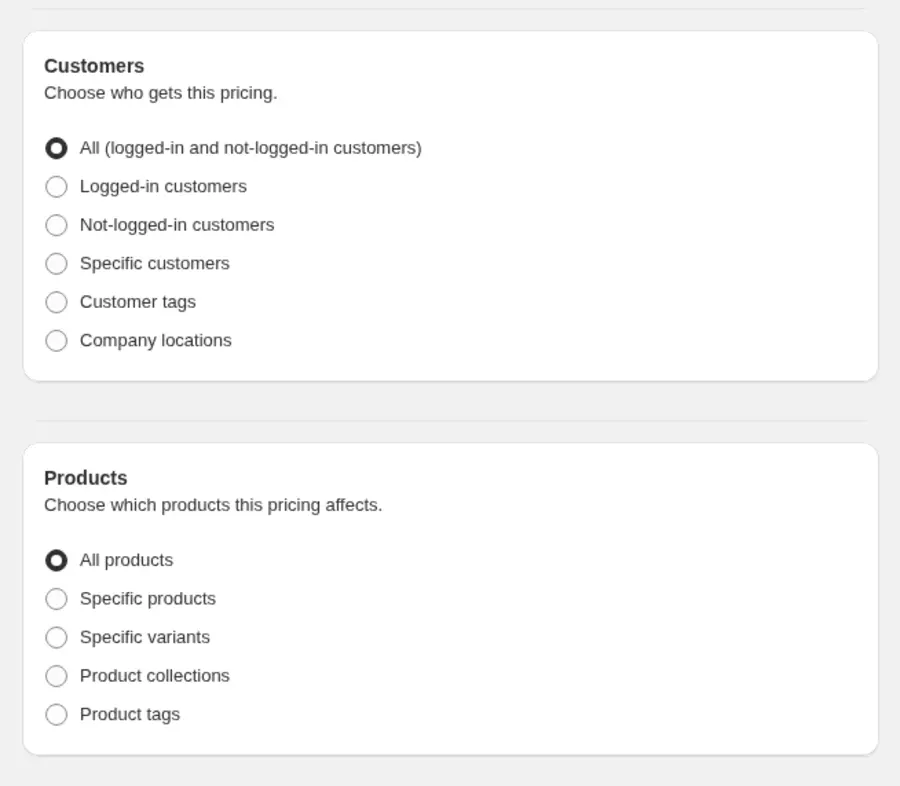
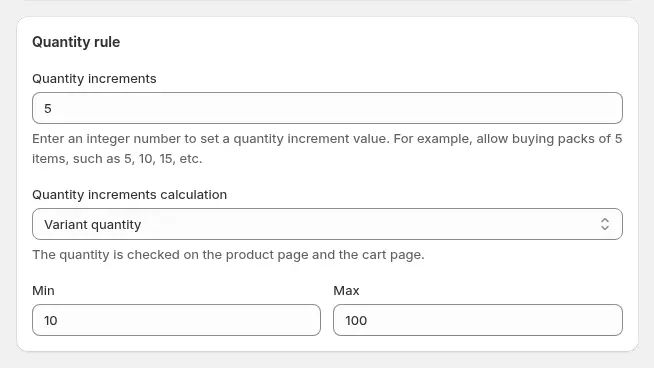
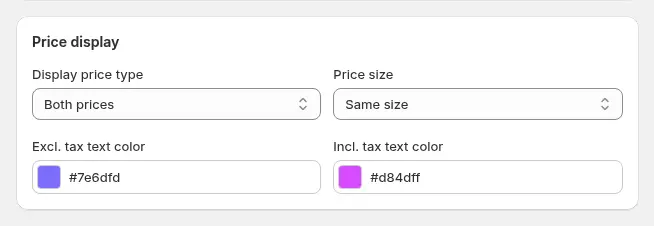
These images show how the options look in the BSS admin. They are examples from the user guide, not Apes Lab’s own settings. We cannot see the logged-in storefront, so we do not describe what an approved buyer pays.
How to add a B2B channel to a consumer store
Apes Lab shows that you do not have to rebuild a store to open wholesale. These are the steps, in the order that keeps the consumer experience untouched.
- Create the access form first. Use a registration form with a tax number as a required field. The guide build a wholesale registration form walks through the fields.
- Link it from the footer. A footer link is quiet enough for consumers and easy to find for a retailer. Publish the form as described in publish your wholesale registration form.
- Tag approved buyers. Decide the tag names before you write rules. One tag per price level is easier to manage than one per customer.
- Add pricing rules by tag and by collection. Apes Lab targets tags by collection and by product. Use wholesale discounts by collection or product tag as a model.
- Set quantity rules where the supplier ships in packs. Quantity increments keep orders aligned with how you pick and pack.
- Show the right tax. Business buyers usually compare prices without VAT, so choose how prices display with and without tax.
- Hide the wholesale collection from guests and test every market. A multi-market store needs a test in each language and currency.
Mistakes to avoid
- Asking for too much at registration. Every extra mandatory field costs you applicants, so keep to what you need to approve.
- Leaving a heading untranslated while labels are translated. Check each language of the form, as in the Apes Lab example.
- Letting wholesale rules overlap by accident. When several rules match one customer, priority decides which one wins, as explained in which B2B pricing rule wins.
What other merchants can copy
- Add B2B without changing the consumer store. A footer link and a form are enough to start a wholesale channel.
- Use a tax number as the filter. A required VAT field keeps private shoppers out and gives you something to verify.
- Keep the form short. Name, email, password, company, address and a tax number cover most cases.
- Test every language. A heading left in one language while the labels are in another can look unfinished.
- Hide the wholesale collection from guests. A B2B collection that redirects keeps wholesale products away from consumers.
- Use quantity increments for pack sizes. They stop a retailer from ordering a size run in the wrong multiple.
- Ask the vendor for front-end changes. The review says the team customized the front end so the buyer experience matched the theme.
For the broader pattern, read sell B2B and B2C from one Shopify store.
The merchant’s review
The app is amazing but in order to let the customers have the best experience i’ve talked to the team for some front end customizations. […] The customer service is at a very high level.
I totally recommend this app, it’s team is amazing.
Apes Lab, Italy, review on the Shopify App Store, 5 of 5 stars, March 7, 2025. Staff names omitted and marked […]
FAQ
Can I run B2B and B2C on the same Shopify theme?
Yes. Apes Lab keeps its consumer store unchanged and adds a registration page and customer-targeted rules. Prices, quantity rules and tax display change for approved customers. See sell B2B and B2C from one Shopify store.
Why ask for a VAT number on a wholesale form?
It separates businesses from consumers and gives the team a number to check. In the EU you can also validate it at registration. See sell VAT-exempt to EU businesses with a valid VAT ID.
How do I hide a wholesale collection from guests?
Use a lock rule that checks login or customer tags, or restrict the collection in your theme. The BSS B2B Lock guide explains how in hide wholesale collections from guest users.
What are quantity increments?
A rule that lets a customer buy only in multiples, for example packs of 5. It prevents orders such as 7 units when the supplier ships in fives. See the quantity increments guide.
Does this story show business results?
No. It reports no sales, order or customer numbers, because we have none from the merchant. It describes public storefront behavior, configuration facts and the merchant’s public review.
This store spotlight is based on Apes Lab’s public website and its public review on the Shopify App Store, as of 2026-10-05. Screenshots show the public storefront. Admin images are labelled examples from the BSS user guide.