BSS B2B Solution: Recurring Orders

Recurring Orders for Shopify B2B: Repeat Wholesale Orders

Recurring Orders is a BSS B2B Solution add-on that creates repeat B2B orders on a schedule. Shopify lists subscriptions as incompatible with B2B, so wholesale shops often retype the same order. You pick a buyer, products and a cycle. Each cycle creates a draft to review, or an order or invoice automatically, at the buyer's current B2B prices.

  • By BSS B2B Team
  • Reviewed by Hoa Nguyen, Senior Marketer. Last reviewed
  • Last updated
Install BSS B2B Solution See all BSS B2B Solution features Needs the Essential, Advanced or Platinum plan, plus the Recurring Orders add-on ($99/month). BSS B2B Solution has a 14-day free trial on paid plans. 4.9 out of 5 from 1,202 reviews on the Shopify App Store (as of November 5, 2026).

Why do Shopify subscriptions not fit B2B companies?

Shopify's B2B considerations page lists Subscriptions among the features that are not compatible with B2B, even though a wholesale buyer who orders the same cartons every month looks like a perfect subscription.

That leaves a wholesale shop with two common options. Someone on your team builds the same draft order by hand each cycle, with the right company location, prices and payment terms. Or the buyer places the order again each time, if they remember.

Shopify's subscription help describes customers choosing a subscription purchase option and paying an agreed price on a schedule. A wholesale account works differently. The price comes from B2B rules for that buyer, and payment often follows Net Terms.

Recurring Orders covers that gap. You set up the schedule once in the BSS B2B Solution admin. On each date, the app creates the order for you. The buyer does not have to log in or remember to reorder.

Shopify changes what B2B supports over time, so check its page before you rely on this comparison. We read it on November 9, 2026.
Who is Recurring Orders for?

It fits shops whose wholesale buyers order the same list on a cycle. A cafe restocks every week. A retailer replenishes every month. A salon orders the same supplies every six weeks.

If most of your buyers order something different every time, you do not need a schedule. A reorder page, where the buyer repeats a past order on demand, is the better tool. The comparison below shows the difference.

How do I set up a recurring order schedule?

Recurring Orders is an add-on, so start it first. Then open B2B orders & discounts > Recurring Orders.

  1. Add Recurring Orders to your plan

    Open Pricing plans, scroll to Add-ons and start the 14-day free trial. You need a paid plan: Essential, Advanced or Platinum. The Free plan cannot buy it. You do not need Net Terms. After you add it, the page may say Recurring Orders is getting ready while the app loads your pricing rules. It usually takes a few minutes.

  2. Click Create schedule and choose the buyer

    Pick the customer. If the customer buys for a company, choose the company location next. The buyer and location cannot be changed later. To order for someone else, create a new schedule.

  3. Add products and quantities

    Search or browse and add the products that go into each order. One schedule holds up to 50 products, and each quantity can be 1 to 99,999. Prices are not stored here, because each cycle works them out again.

  4. Set the cycle and the first date

    Under Repeat every, enter a number from 1 to 12 and choose weeks or months. Choose a First order date, today or later. Each order is created at about 6:00 AM store time on its date. If you choose months and a day after the 28th, shorter months use their last day.

  5. Choose Review or Auto

    Review creates a draft order each time. Auto creates the order, or sends the invoice, without your review. The next section shows what each one does.

  6. Test with Run now

    Open the schedule and click Run now. It creates one draft order with today's B2B prices and does not change your dates. Run now makes only a draft, even in Auto, so nothing is sent to the buyer.

New to the app? Install it, then start the Recurring Orders trial. Already on a paid plan? Add it from Pricing plans.

Review or Auto: which mode should a schedule use?

Review is the default and the safer start. Use Auto for buyers whose orders you no longer check.

ModeBuyerWhat each date createsWhat the buyer gets
ReviewAny buyerA draft order at the buyer's B2B prices. You open it in Shopify and create the order or send the invoice.Nothing until you send it.
AutoA company location that has payment terms in ShopifyThe order, with the location's payment terms, for example Net 30.An order that is due by the payment terms, like your other Net Terms orders.
AutoA customer with no companyA draft order, then Shopify emails the buyer an invoice.An invoice by email. The order is created when the buyer pays.

Auto is not offered for a company location that has no payment terms in Shopify. Add terms to the location or use Review. When you switch a schedule to Auto, orders go out without your review starting with the next date.

Are prices fixed, or calculated again each cycle?

They are calculated again. Each order gets the B2B prices that apply to that buyer on its date, from your pricing rules. If you change a rule between two cycles, the next order uses the new price.

Example: a buyer gets 15% off a product listed at $20, so the first draft prices it at $17. You then change the rule to 20% off. The next draft prices it at $16.

If a buyer has a contract price that you must hold for a year, use Review mode and check each draft before you send it.

Changes to a schedule apply from the next order. Draft orders and orders that already exist do not change.

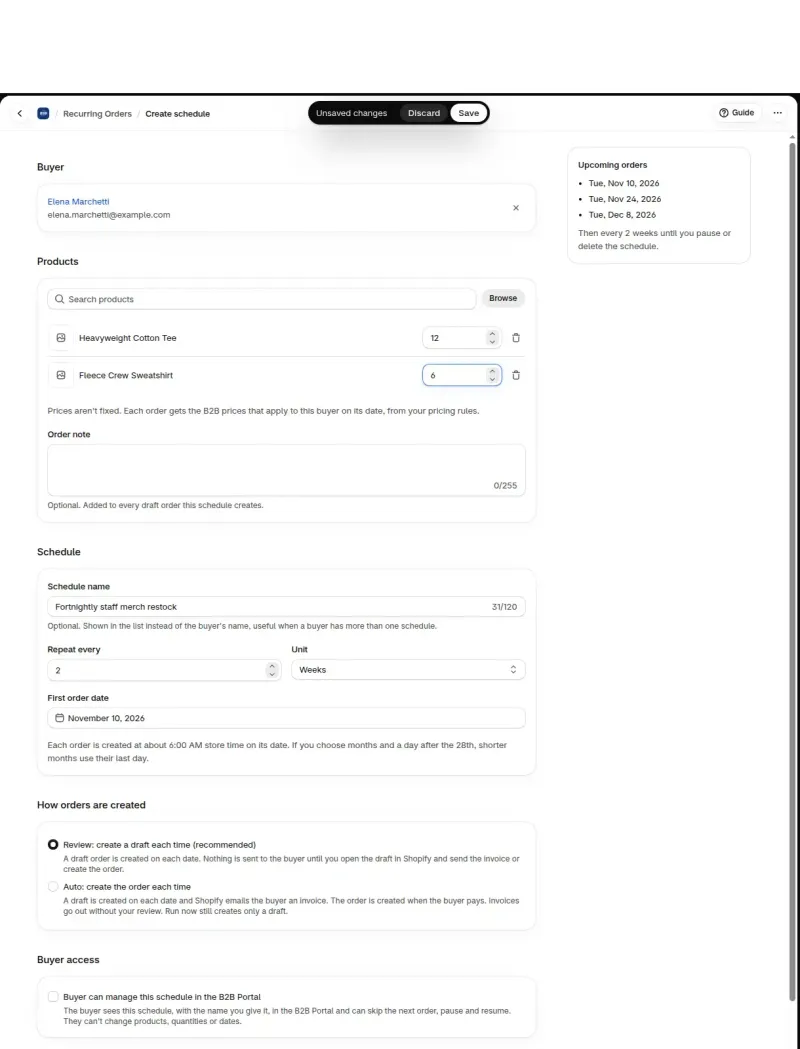
Recurring Orders form: two products, every 2 weeks, Review mode
The Create schedule form holds the buyer, the products, the cycle and the mode, and lists the next three order dates.

How is Recurring Orders different from Reorder and Shopify subscriptions?

Recurring Orders starts from your admin on a schedule, Reorder starts from the logged-in buyer, and Shopify subscriptions start from the customer and are not compatible with B2B.

QuestionRecurring OrdersReorder page in BSS B2B QuoteShopify subscriptions
Who starts the orderYou, once, in the admin.The logged-in buyer, each time.The customer, by choosing a subscription purchase option.
When the order is madeOn a schedule you set, every 1 to 12 weeks or months.When the buyer repeats a past order.On the subscription schedule.
What is createdA draft order, an order or an invoice at B2B prices worked out again each cycle.A Shopify draft order at current prices, with a checkout link or an invoice email.Shopify lists subscriptions as not compatible with B2B.
Where it comes fromAn add-on for BSS B2B Solution.BSS B2B Quote, Growth plan or higher.A Shopify feature.

Use Reorder when the buyer decides to repeat. Use Recurring Orders when you already know the order will come.

How do I see what each cycle did?

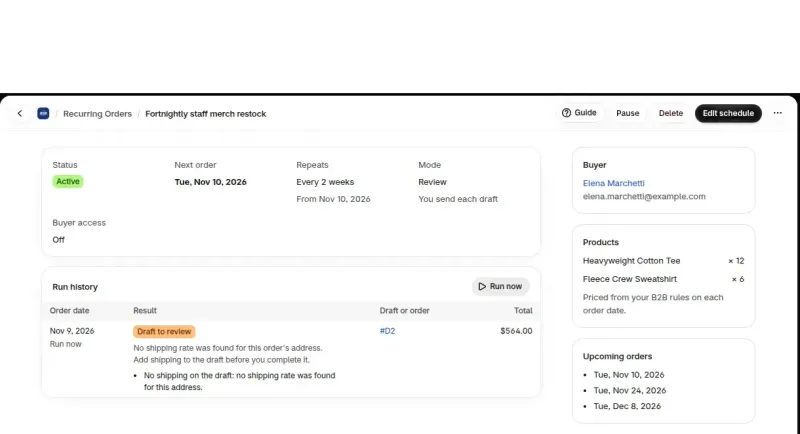
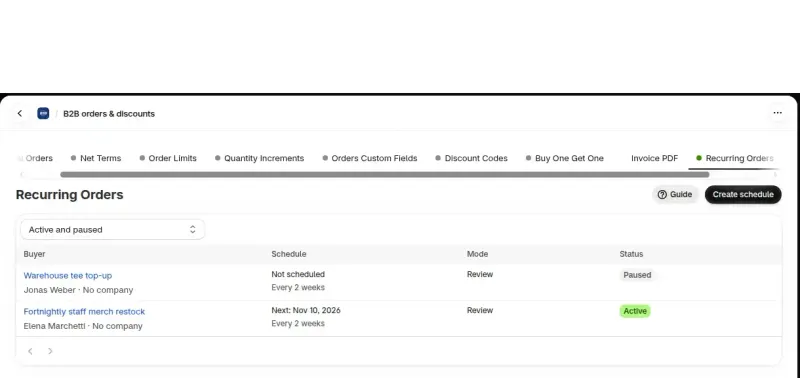
The schedule list shows each schedule's next date and its status: Active, Paused, Paused: add-on ended or Ended. Open a schedule to see its Run history. Each date lists the draft order or order it created, the result and any error.

You can pause, resume, edit or delete a schedule. Deleting stops all future orders. Draft orders and orders already created stay in Shopify.

Give a schedule a name such as Weekly cafe restock, and it shows in the list instead of the buyer's name. An order note is added to every draft the schedule creates.

Recurring order detail with run history and a draft to review
A schedule's Run history lists each date with its result and the draft order that waits for your review.

What does Recurring Orders not do yet?

Version one creates drafts, orders and invoices only. It does not charge cards, and some runs stop at a draft. Check the list before you promise a buyer anything.

  • It does not charge a saved card. Each cycle creates a draft, an order with payment terms or an invoice. Buyers pay through payment terms or the Shopify invoice, as they do today.
  • It does not manage a subscription app's renewals. We do not promise that a renewal created by a subscription app keeps your BSS B2B discount.
  • Auto can stop at the draft. This happens if the order breaks an order limit, if Shopify offers no shipping rate for the address, if some amounts from your B2B rules cannot be added, or if the company is over its limit and you also run Credit limit. The draft stays in Shopify for you to review and complete, and the run history says why.
  • A late date is skipped. If a date passes more than 48 hours before the app can run it, the run history records it as skipped.
  • One failed order does not stop the schedule. Shopify errors are retried a few times, then recorded in the run history, and the next date still runs. The one exception is a deleted customer: the schedule ends.
  • Paused dates are skipped. When you resume a paused schedule, the dates missed while it was paused do not create extra orders.
Recurring Orders list showing an active and a paused schedule
The Recurring Orders list shows each schedule's next date, mode and status, so a paused schedule is easy to spot.

Which plans can use Recurring Orders, and is there a trial?

Recurring Orders works on the paid plans Essential, Advanced and Platinum. The Free plan cannot buy it. Unlike Credit limit, it does not need Net Terms.

The add-on has a 14-day free trial. In Pricing plans, the Add-ons section shows the price and your new total before you confirm, and the add-on is added to your plan price.

When the trial or the add-on ends, your schedules are paused and kept. No draft orders or orders are created while it is off. After you add it again, open each schedule and click Resume.

Use cases for Recurring Orders

Each use case shows one setup with screenshots. Browse all use cases.

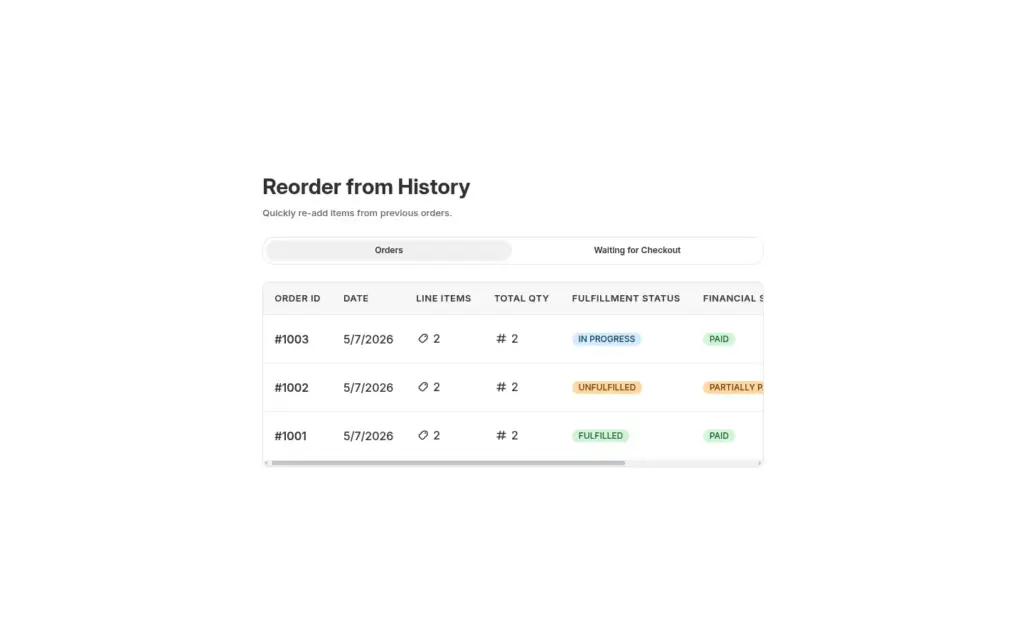
Reorder from History page with Orders tab and past order list
  • BSS B2B Quote
  • Food & Beverage

Reorder Page for Repeat Wholesale Buyers

Give logged-in restaurants and retailers a Reorder page where they repeat a past order from their history, edit quantities in a review window and place it as a draft order, with BSS B2B Quote.

Explore use case: Reorder Page for Repeat Wholesale Buyers

Guides and glossary

Read these next for the full detail.

Glossary

Net termsDraft orderReorderCompany location

More BSS B2B Solution features

Each feature has its own page. See also all BSS B2B Solution features.

Stop retyping the same wholesale order

Install BSS B2B Solution from the Shopify App Store, with a 14-day free trial on paid plans. Add Recurring Orders from Pricing plans.

Also: BSS B2B Lock for hidden prices for guests and BSS B2B Quote for quotes and reorders.

Frequently asked questions

What does Recurring Orders in BSS B2B Solution do?

It creates repeat orders for a B2B buyer on a schedule you set. You choose the buyer, the products and quantities, and a cycle of every 1 to 12 weeks or months. Each date creates a draft order for you to review, or an order or an invoice automatically, at the buyer's B2B prices for that date.

Why not use a Shopify subscription app for wholesale buyers?

Shopify's B2B considerations page lists Subscriptions as not compatible with B2B. Check Shopify's page for any change since November 9, 2026. Recurring Orders is built for B2B accounts instead. It works with company locations, payment terms and your B2B pricing rules, and you set the schedule up in the admin. If your repeat orders only need Shopify's own catalog prices for company accounts, a simpler repeat-order tool can be enough. Recurring Orders is for shops that price wholesale with your BSS B2B pricing rules, or sell to buyers without a company account.

Does Recurring Orders charge my buyer's card?

No. Each cycle creates a draft order, an order with payment terms or an invoice. Buyers pay through payment terms or the Shopify invoice, as they do today. Recurring Orders does not charge a saved card, and it does not manage renewals from a subscription app.

How much does Recurring Orders cost, and is there a free trial?

Recurring Orders is $99/month, or $1,069.20/year on yearly billing, as of November 9, 2026. It is added to your plan price. There is a 14-day free trial. You need the Essential, Advanced or Platinum plan. Pricing plans shows the current price before you confirm.

Is Recurring Orders the same as the Reorder page in BSS B2B Quote?

No. The Reorder page lets a logged-in buyer repeat a past order whenever they decide to. Recurring Orders creates orders on dates you set, starting from your admin. A store can use both, because they start in different places and serve different buyers. Reorder suits buyers who choose their own timing, and Recurring Orders suits orders you already expect.

What happens to my schedules if the add-on ends?

Your schedules are paused and kept, with their history. No draft orders or orders are created while the add-on is off. After you add it again, open each schedule and click Resume. Dates missed while a schedule was paused are skipped, so you do not get extra orders.

Sources, method and update log

Feature behavior follows the Recurring Orders screens and billing catalog in BSS B2B Solution, read on November 9, 2026. The Shopify statements come from the two Help Center pages listed below, read the same day. The price matches the app's billing catalog on that date; Pricing plans in the app shows the current price. We make BSS B2B Solution, BSS B2B Lock and BSS B2B Quote.

Sources

  1. Shopify Help Center: Considerations for B2B on Shopify, read . Subscriptions listed among the features that are not compatible with B2B.
  2. Shopify Help Center: Subscriptions, read . Customers choose a subscription purchase option and pay an agreed price on a schedule.
  3. BSS B2B Solution app: Recurring Orders screens and add-on billing, read . Schedule fields, modes, run history, limits, plans, trial and price.
  4. BSS B2B Quote: Reorder page, read . How the Reorder page differs from a schedule.

Update log

  • : First version.
  • : Added three screenshots of the app.
Install BSS B2B Solution 14-day free trial on paid plans